Picture and sound share one beat grid

Cut, finish, generate, and publish from the music.

Edit video beside the arrangement, retime it to musical structure, and let notes or audio drive the visual result.

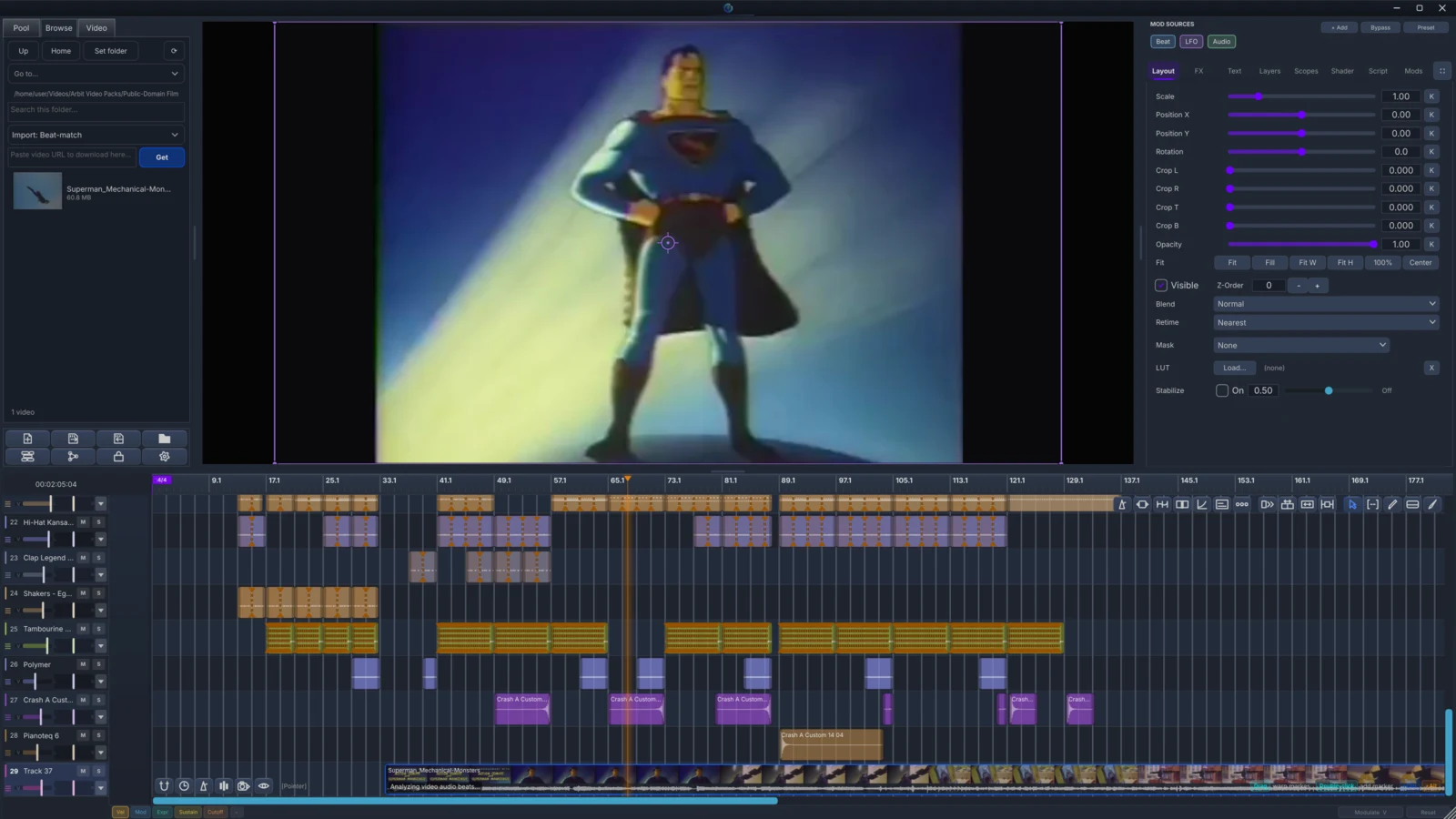
DonutStudio Video Editor showing a public-domain animated film, layout controls, and a beat-aligned multitrack timeline
Video

Cut, finish, generate, and publish visuals from the same musical timeline.

VideoFREE + PRObeta

Video Editor

Cut the picture on the same beat grid.

Edit clips, multicam cuts, effects, text, transitions, and exports on the music project's shared timeline.

Inside the workflow

A real NLE beside the musical arrangement

Arrange clips, retime edits to musical structure, switch multicam angles, grade and finish the composite, and preview the result against project time.

  1. ArrangeVideo · image · generator clips
  2. RetimeBeat warp · speed ramp · interpolation
  3. FinishColor · LUT · text · loudness · export

Musical timing is native

Video clips and automation use the same beat timeline as notes and audio.

Deep editing paths

Masks, speed ramps, stabilization, roto, proxies, and cache controls remain editable project state.

Timing inside Video Editor

Retiming & Beat Warp

Detect source beats, fit them to project time, draw speed ramps, preserve audio pitch, and choose nearest, frame-blend, or Speed Warp interpolation.

  • Source beat detection and project-grid fitting
  • Pitch-preserved speed ramps
  • Nearest, Frame Blend, and Speed Warp interpolation
Finishing inside Video Editor

Video Finishing

Grade with effects and LUTs, finish overlays and loudness, inspect the composited result, and export finished video or a conform for another editor.

  • Effects, LUTs, and composited overlays
  • Loudness and visual inspection
  • Finished video and conform export
VideoFREE

URL Media Download

Bring source material straight to the timeline.

Turn a supported URL into editable video or sample-ready audio using the downloader already installed on your system.

Included with DonutStudio Free
Inside the workflow

A supported URL becomes project media

Acquire video or sample-ready audio with your installed downloader, then send it to the media pool, timeline, or sampler.

  1. URLPaste source
  2. AcquireVideo or WAV
  3. UseTimeline or sampler
VideoFREEbeta

Auto Subtitles

Turn speech into timed titles locally.

Transcribe a clip with Whisper and place editable subtitle overlays directly onto the musical timeline.

Included with DonutStudio Free
Inside the workflow

Speech becomes editable timed typography

Transcribe locally with Whisper, place each segment as a timeline overlay, and style or export the captions.

  1. ListenLocal Whisper model
  2. TimeSegmented text overlays
  3. FinishStyles + optional SRT

Editable after generation

Each result is an ordinary text overlay with timing, layout, and styling controls.

Speech stays local

Transcription runs through the installed on-device environment.

VideoFREE

YouTube Mode

Frame the performance for the audience.

Prepare a clean, readable piano-roll view for tutorials, demonstrations, and screen-recorded performances.

Included with DonutStudio Free
Inside the workflow

A performance view made for explanation

Center the playhead, keep active notes readable, and surface key presses for tutorials and performances.

  1. FrameCentered playhead
  2. FollowSoft note-fit
  3. ExplainVisible key presses
VideoFREE + PRObeta

Media Machine

Let the score drive the image.

Route notes, clocks, harmonic relationships, and audio analysis into shaders, particles, raymarching, and visual parameters.

Inside the workflow

The score becomes a visual modulation source

Route clock, notes, harmonic relationships, or audio analysis into shader, particle, effect, and transform parameters.

  1. SourceNote · clock · harmony · audio
  2. RouteDepth · curve · smoothing
  3. ImageShader · particles · effects

Music-aware generators

Shader, particle, and raymarch clips remain ordinary editable timeline sources.

Inspectable modulation

Render-free probes and live meters show what each routing contributes.

Export parity

The same modulation engine evaluates each rendered frame.

VideoPRO

Social Publishing

Render once, then send the finished work out.

Publish a completed audio or music-video render through connected music communities and social destinations from one flow.

Inside the workflow

One render, connected destinations

Upload the finished release through an enabled music host and share its link through connected social accounts.

  1. RenderFinished release
  2. HostMusic community
  3. ShareConnected accounts